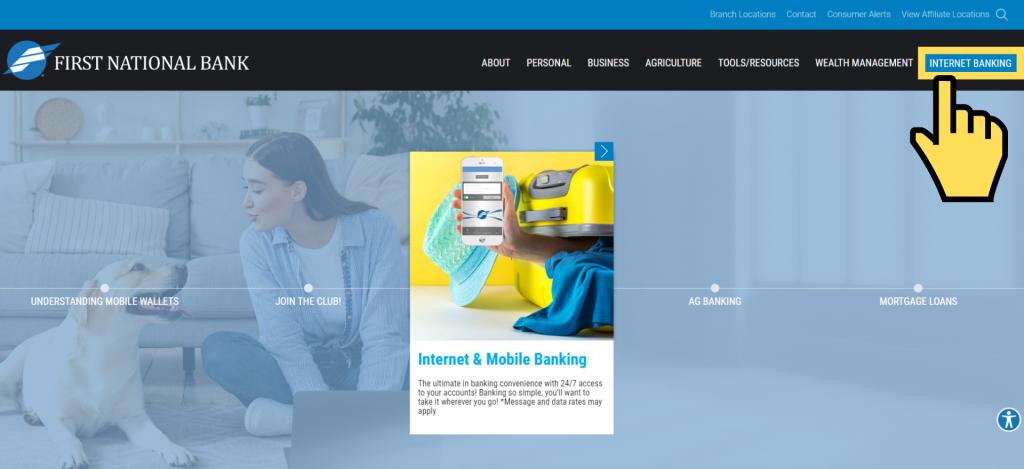
Simply select the blue box on the top right side of each page, titled Internet Banking.
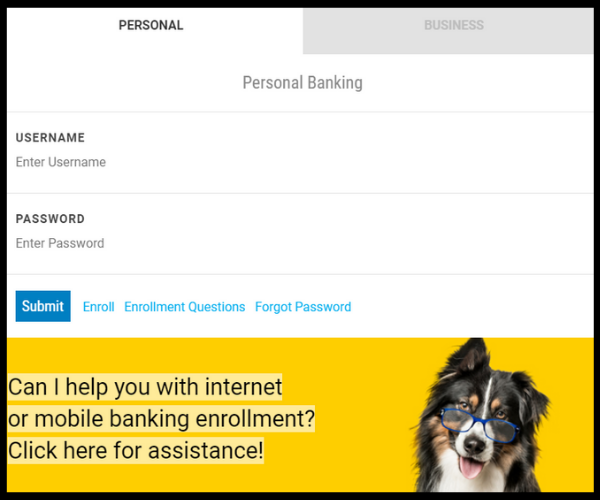
Next, a log on box will appear.
Personal Internet Banking: Enter your Username and Password. Then select Submit.
Business Internet Banking: Select the gray box titled Business Banking. Then enter Username and Password. Then select Submit.
And, there you have it!
External Link Disclaimer
Important Notice About External Links
From time to time, we provide links to other websites for the use of our visitors, which have been compiled from internal and external sources. By clicking “Continue” below, you will be opening a new browser window and leaving our website. Although we have reviewed the website prior to creating the link, we are not responsible for the content of the sites.
Information on linked website pages may become dated or change without notice, and we do not represent or warrant that information contained on these linked pages are complete or accurate. We suggest that you always verify information obtained from linked websites before you act upon such information.
The privacy policy of this bank does not apply to the website you visit. We suggest that you always verify information obtained from linked websites before you act upon such information.
Important Notice About Email
Regular e-mail is not necessarily secure against interception. If your communication is very sensitive or includes personal information such as your account numbers, credit card number, or social security number—you may want to call us, send it through the U.S. Post Office, or use our Secure Contact Form.